
 Print Article
February 2026
Navigating Legacy Technology in Community Banking
by Raymond Bolton, Risk Management Specialist, Supervision and Regulation, Federal Reserve Bank of Chicago*
For many community bankers, the Microsoft Windows blue glass panes that first appear on computer screens are a constant and sure sign that a new workday has begun. Those panes are also the last thing to appear on screens signaling the end of the day.
But those iconic panes are not immune to the march of progress. On October 14, 2025, Microsoft officially ended standard support for Windows 10, an operating system widely used in the community banking industry for the last decade, leaving many systems and environments exposed and vulnerable. The end of support for Windows 10 means that all computers, laptops, and systems in a bank's environment that use this operating system will no longer receive security updates, fixes, or technical assistance. However, Windows 10 isn't the only software facing this technology end of life. It is just one of many examples that highlight an often overlooked but major challenge that many banks face: legacy technology.
To put this risk in perspective, a 2025 survey of executives found that the three top information technology (IT) risks included underperforming operations and legacy IT infrastructure, third-party risks, and cyberthreats (figure).1 Critical security devices and networking equipment are no exception to this technology life cycle. Firewalls, gateways, routers, and load balancers are assets that also should be monitored for their end-of-life dates.
Community banks need to monitor and control the risks arising from operations and legacy technology. Banks are trusted institutions in their communities and, as such, their customers expect that banks will keep their data and assets secure and private. Using legacy technology increases the number of security vulnerabilities that malicious actors can exploit. In addition to cybercrime, the use of legacy technology can increase the frequency and severity of outages and network failures. These security and operational events can raise a bank’s operational risk and leave customers wondering if their bank can meet their banking needs.
Figure: Executives’ Top IT Risks
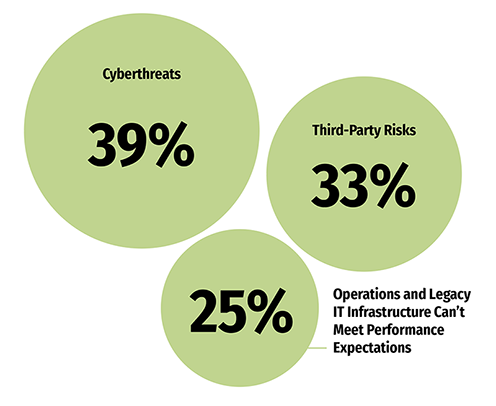
Source: Protiviti, Executive Perspectives on Top Risks for the Near- and Long-Term, 2025
Understanding the Jargon
Legacy technology refers to technology hardware, software, or firmware that is outdated and no longer supported by the vendor or has become too difficult for a bank to maintain and integrate with newer systems. Think of legacy technology as an old car: It may still run, but the manufacturer stopped making replacement parts, finding a mechanic with the requisite knowledge is more difficult, and the car may lack more modern safety features. Common examples of legacy technology in community banks include core banking systems that are built on older platforms, outdated operating systems such as Windows 7 or macOS 12, and network hardware including switches and routers that no longer get firmware updates.
Another important term when discussing legacy technology is end of life (EOL). EOL refers to IT software and hardware that have reached the end of their usefulness as defined by the manufacturer or developer and will no longer be produced or sold. While a manufacturer or developer may still provide some critical security updates to customers, the software or hardware will not reflect technological advancements, and compatibility issues and hardware failures may become more frequent. A related term is end of support (EOS), which indicates the point when a technology provider will no longer provide security updates, fixes, and technical assistance. However, many providers will offer an extended support option for a fee; customers can purchase an extension for critical security updates and assistance for a limited period, often to help maintain assets during a transition to newer solutions. When this limited period ends, the bank is entirely responsible for technology security and stability and will need to either upgrade or accept the increasing security and operational risks associated with continued use.
The Risks of Holding On
The most pressing concern about legacy technology is that banks are prime targets for malicious cyberactivity. Without critical security patches from a technology vendor, weaknesses are never fixed, leaving systems vulnerable to cybercriminal activity. Many legacy technologies also lack modern security standards, such as multifactor authentication, extensive intrusion detection capabilities, or modern encryption, which further exposes a bank to bad actors. In addition, banks are also exposed to data breaches, malware, ransomware, and financial losses.
Failing to upgrade legacy technology also presents compliance challenges. Regulatory cybersecurity requirements, such as “Interagency Guidelines Establishing Information Security Standards,” and “Computer-Security Incident Notification,” are evolving to ensure the safety of customers’ data, banks’ continued soundness, and the overall integrity of the U.S. financial system.2,3 Often, older technology can no longer remain compliant.
Hurdles to Modernization
So why do banks continue to use legacy technology? Perhaps the biggest reason is budget constraints. Even if upgrading technology is a net cost savings in the long run, an upgrade can be expensive upfront and difficult to work into a bank’s operating budget. From new products to capital and liquidity needs to day-to-day operational costs, bank management may face challenges to justify an immediate, large capital expenditure.
But cost isn’t the only factor. The fear of an operational disruption can present yet another hurdle to modernization. Banking customers expect rapid and reliable access to funds and banking services, and when a bank upgrades or migrates to a new system, it also runs the risk of downtime, data loss, or service disruptions. Limited in-house IT staff resources can also be a challenge, and these individuals may lack the time or expertise to plan and execute a major system upgrade or migration. Although managed network service providers often offer a popular IT solution for many community banks, there may be additional fees for a project of this scale.
Charting a Path Forward
The first step a bank can take is to identify all of its IT assets, both hardware and software. This includes understanding their criticality, existing vulnerabilities, and interdependencies so that these factors can be incorporated into any effort to upgrade or migrate a legacy asset. Accurate, comprehensive, and up-to-date inventories and assessments of IT assets are critical not only to modernization efforts but also to the ongoing maintenance of a safe and secure operating environment.4
Before any modernization efforts begin, banks should develop a forward-looking IT strategic plan with a multiyear technology road map that includes regular refresh cycles. The technology plan should be created in tandem and align with the bank’s overall business plan. Modernization efforts and ongoing IT investments are imperative for the long-term success of any bank, particularly those experiencing an increase in the number of customers expecting their bank to offer modern banking solutions.
Once the IT inventory and assessment are completed and a strategic plan is adopted, upgrades and replacements should focus first on the most critical and vulnerable systems, such as internet-facing applications and core processing. A phased approach to upgrading systems can spread costs over a longer time frame while reducing the risk of any major disruptions. When planning a system modernization, a bank may want to consider various cloud-based solutions that will allow future scalability and reduce ongoing maintenance. But even with a cloud-based solution, it is the bank’s responsibility to protect its customers’ information.5
To safeguard the transition process when moving from legacy technology, banks can consider enhancing the expertise of bank staff responsible for maintaining IT assets. This investment can include training current staff on newer technologies and hiring new talent with modern IT skills. Engaging consultants during significant modernization projects can help avoid costly system disruptions or downtime.
Finally, IT modernization takes time. During the process, there should be sufficient mitigating controls to limit the risk of using legacy technology. Mitigating controls can include segmenting legacy systems to limit the potential impact of security breaches, enhancing security monitoring and alerting for these systems, and enforcing access controls to restrict access to essential personnel. Community banks can also collaborate with their network service provider to implement allowlisting6 for legacy systems, minimize data storage on legacy systems, and develop and test comprehensive incident response plans to ensure a quick and appropriate response to any data breach or system failure.
Securing the Future of Community Banking
When community banks continue to use legacy technology, the risk of cybercrime increases. Many newer tools are available to nefarious individuals with less technical expertise, making cybercrime more accessible to them. Beyond cybersecurity vulnerabilities, continuing to use legacy technology leads to operational inefficiencies that only grow over time as hardware fails, parts are discontinued, and older IT systems are unable to integrate with newer systems. Competitive disadvantages will also increase if a bank uses legacy technology when its customers are expecting seamless modern banking solutions.
Although IT modernization may be a challenge technically and present budget constraints, a community bank should maintain the trust of its customers and appropriately secure their private and sensitive information. Modernizing IT and operating systems isn’t only about a bank avoiding risks: Ultimately, a community bank will be able to build more resilient and efficient banking operations for its customers.
- *The author thanks Andrew Pasternak, senior cybersecurity policy analyst, Division of Supervision and Regulation, Federal Reserve Board, for his contributions to this article.
- 1 See Protiviti’s 2025 report, Executive Perspectives on Top Risks for the Near- and Long-Term.
- 2 See 12 CFR 208 D-2, “Interagency Guidelines Establishing Information Security Standards.”
- 3 See 12 CFR 225 Subpart N, “Computer-Security Incident Notification.”
- 4 For more information, see Section III.B.1 of “Architecture, Infrastructure, and Operations” in the Federal Financial Institutions Examination Council IT Examination Handbook.
- 5 For more information on this topic, see the author’s “Security in the Cloud: A Discussion with the Regulators” article in the Sixth Release 2024 of Community Banking Connections.
- 6 Allowlisting is a cybersecurity safeguard by which only an approved list of applications or application components can be accessed using an organization’s computer systems. See the National Institute of Standards and Technology’s definition.